
By EdCaptain editorial desk · Published
Your child opens the game they have been playing for weeks and sees that it is leaving the subscription. You have already paid for the service—and perhaps an extra level pack. Does the family now need to buy the whole game?
Pause the checkout while you separate three questions: what gives you permission to play, what extra content you bought, and where the child’s progress is saved. Those are connected, but they are not the same thing. This is a caregiver’s checklist for a catalogue departure, rather than a recommendation to purchase any particular game.
Check what is actually ending
Open the service’s official notice or the game’s listing in the account you normally use. Record the exact title, edition, platform and departure date. If a time is given, note its time zone. Ask official support if the notice is unclear; another player’s screenshot may concern a different region or version.
Distinguish a game leaving a catalogue from your own subscription expiring, a trial ending, a technical fault or the publisher closing an online service. The next step depends on which event is happening.
For example, the PC Game Pass FAQ says catalogue access lasts until the subscription ends or the game leaves the library. Availability also varies by region, plan and platform. Paying for another subscription period is therefore not proof that a departing game will remain available.
PlayStation’s Plus games FAQ distinguishes monthly games added to your library from the Game and Classics Catalogues, where titles may have removal dates. Establish which benefit supplied this game before applying advice about a different type of entitlement.
Make a small access record
Use a private note, with no passwords or payment details. Four lines are enough:
- Base game: subscription access, a separately purchased digital copy, a disc, or not yet confirmed.
- Playing account: the profile your child actually uses and the adult responsible for its setup.
- Extras: the exact add-ons, packs or editions bought, with receipts kept separately.
- Progress: the save location and latest copy you have actually verified.
An installed game icon does not answer all four questions. Nor does a receipt for an expansion establish that you bought the base game. Look at the item description in the purchase history rather than relying on “we paid for that game”.
Keep the existing profile and settings while checking. Moving play to an adult’s account or buying through a different account may introduce new access and progress questions rather than resolve this one.
Do not let an add-on make the decision for you
A child may reasonably ask, “But we bought the extra levels—why won’t they open?” Explain that the extra content and permission to launch the underlying game can have different conditions.
PlayStation’s FAQ states that when a catalogue game leaves the service, access to its associated purchased DLC and add-on content is also lost through that arrangement. Buying the title may provide a route to use the purchased extras again. Check the compatible edition and platform first; resubscribing alone is not a promise that a departed title will return.
For your own service, ask: “We bought this named add-on while accessing the base game through the catalogue. After departure, which exact base-game purchase would make it usable on this device?” Do not assume another publisher’s rules apply.
Then separate the earlier cost from the new choice. Having spent money on extras does not automatically make another purchase useful. Consider whether the child still wants the game, what they would do in it next, and the total new cost of the proposed option.
Verify progress before changing how you play
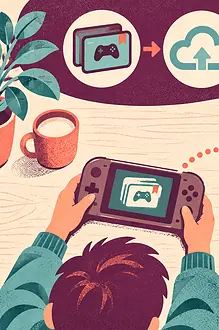
Do not delete saves, reset the device or create a replacement profile to deal with the departure notice. Use the platform’s current instructions to identify the relevant save and any supported backup or transfer. Ask about the exact version if you are considering a different edition.
Streaming adds another question. PlayStation’s save-transfer guidance explains that streamed and downloaded game saves are stored differently, and transfer between those forms is not automatic. Its supported process can involve PlayStation Plus cloud storage. A later download is not, by itself, confirmation that the child will continue at the same point.
Ask support before paying if continuing progress is the main reason to buy: “Will this profile’s save work with this exact edition, and what steps or active subscription features are required?” Keep the answer. A screenshot of an achievement can be a keepsake, but it is not a playable save backup.
If the plan also involves changing hardware, use our new-console transfer checklist. Keep that separate migration verified before wiping an old device.
Choose a response without turning the deadline into a race
The practical options might be to buy a compatible copy, use a supported edition you already have, pause this game, or choose another suitable activity. Compare the actual options available to your account and region. Check any ongoing online-play or streaming requirements rather than assuming a base-game purchase supplies every service.
There is no need to finish every remaining level before access ends. Say, “This subscription’s access is changing. I’m checking what we can keep and what another purchase would do. We haven’t decided to buy it.” An adult can handle the account questions while the child identifies what they would miss.
Keep the usual play boundaries while you decide. Do not bypass age restrictions, share passwords or follow unofficial “keep it forever” download links. Any replacement game still needs its own suitability, communication and purchase checks.
If access has already stopped
Return to the notice and your access record before reinstalling or paying again. Contact the official service or publisher with the title, platform, account context and exact message. Leave passwords and unnecessary child information out of the request.
If the publisher is actually shutting the game’s service down, buying a copy may not solve that problem. Our permanent game-closure guide covers that different situation.
Finish with a clear family decision and a small record of what was verified. You can take the child’s investment in the game seriously while choosing to wait, buy deliberately or move on.
Sources and further reading
- Xbox: PC Game Pass access and availability FAQ
- PlayStation: monthly games, catalogue access and add-ons FAQ
- PlayStation: saves when moving between streamed and downloaded games
Read our editorial policy and review methodology.